Does Your Business Need a Backup Plan? A Local Guide for Bitterroot Valley Businesses

For small businesses in the Bitterroot Valley, data is the most valuable asset you own. From client invoices in Hamilton to medical records in Stevensville, your digital files are the backbone of your operations. If your hard drive clicks its last breath today, your business stops.
This guide provides a direct, technical breakdown of how to protect your business from data loss, the specific risks for local industries, and the exact costs of professional protection.
Why Small Businesses Are the Primary Targets for Data Loss
Problem: Most small business owners assume they are “too small” for ransomware or that a single external drive is enough. In reality, 1 in 5 small businesses will experience a major data loss event this year due to hardware failure, human error, or cyberattacks.
Solution: Implementing a redundant, automated backup system that requires zero daily intervention. You cannot rely on “remembering” to plug in a drive once a week.
Cost: A single day of downtime for a local retail shop or law firm can cost between $500 and $5,000 in lost productivity and missed opportunities.
Examples of common failure points:
- A laptop used for QuickBooks in Florence is dropped.
- A power surge in Victor fries an un-backed-up desktop.
- A “system update” in Corvallis corrupts a critical customer database.
The 3-2-1 Backup Rule: The Professional Standard

Problem: Using only one backup method (like a single USB stick) creates a single point of failure. If the stick fails or the office is damaged, the data is gone.
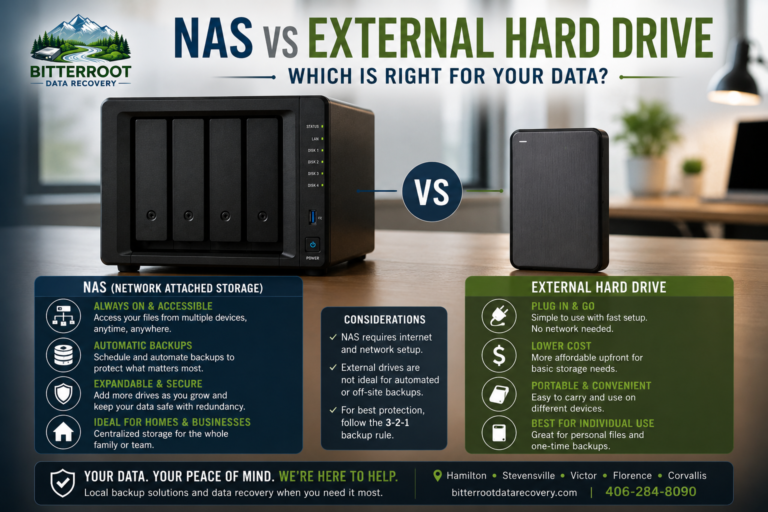
Solution: Follow the 3-2-1 rule. This is the industry standard for reliability.
- 3 Copies of Data: Your working files plus two backup copies.
- 2 Different Media Types: Use two different technologies (e.g., an internal SSD and an external hard drive).
- 1 Copy Offsite: One backup must be physically located somewhere else, typically in the cloud, to protect against fire, theft, or local disasters.
Cost: Adhering to this rule is the difference between a 2-hour recovery and a permanent business closure.
High-Risk Industries in the Bitterroot Valley
Problem: Different businesses have different legal and operational requirements for data retention. Losing data isn’t just an inconvenience; it can be a legal liability.
Solution: Tailor your backup strategy to meet Montana-specific compliance and industry standards.
Industry-Specific Risks:
- Tax & Accounting Firms: You must retain client financials for at least 7 years. Losing these records can trigger IRS complications and massive professional liability.
- Medical & Dental Offices: HIPAA requires specific documentation to be kept for 6 years, and medical records in Montana are generally held for 10 years. A data breach or loss without an encrypted backup leads to heavy fines.
- Retail & Inventory: Losing your POS database means losing your sales history, inventory counts, and tax records.
- Law Offices: Case files and discovery documents are irreplaceable. Loss of these files can lead to malpractice claims.
Cloud vs. Local vs. Hybrid: What Actually Works?

Problem: Cloud backups (like OneDrive or Dropbox) are slow for large restores. Local backups are fast but vulnerable to physical damage.
Solution: Use a Hybrid Backup Strategy. We recommend a local automated backup for instant recovery of deleted files and a cloud-based “cold” backup for disaster recovery.
Comparison Table:
| Feature | Local Backup (Drive) | Cloud Backup | Hybrid (Recommended) |
|---|---|---|---|
| Restore Speed | Fast (Minutes) | Slow (Hours/Days) | Best of Both |
| Physical Safety | Low (Office risk) | High (Data center) | High |
| Reliability | Medium (Drive failure) | High (Redundant) | Highest |
Professional Backup Setup Services & Pricing

Problem: Most DIY backup setups fail because they aren’t configured correctly or the software stops running without the user knowing.
Solution: Professional installation of a “set-and-forget” backup system. We handle the hardware, the software configuration, and the initial data sync.
Our Pricing & Service Packages:
- Basic Backup Setup: $120 – $300 (depending on data volume and number of devices).
- Hardware + Setup Combo: $180 (Includes a high-quality 1TB external drive and full automated backup configuration).
- Ongoing IT Support: $45/hour (1-hour minimum) for periodic health checks and updates.
- Data Recovery: If you are already facing a loss, we offer specialized logical data recovery with a “no cure, no fee” policy.
Local Expertise vs. Big IT Providers

Problem: Large IT firms often require expensive monthly retainers and speak in technical jargon that doesn’t help a small business owner.
Solution: Work with a local partner who understands the Bitterroot Valley. Bitterroot Data Recovery provides transparent, upfront pricing with no hidden monthly fees.
Why Choose Local:
- Speed: We can be at your office in Hamilton or Stevensville the same day.
- Clarity: We explain exactly what we are doing in plain English.
- Transparency: No “managed service” contracts. You pay for the work we do, period.
Action Steps: Protect Your Business This Week
Problem: Procrastination is the #1 cause of permanent data loss.
Solution: Take these three immediate steps to secure your business records.
The “Secure-My-Data” Checklist:
- Identify Critical Folders: Locate where your most important data lives (QuickBooks, “My Documents,” client folders).
- Verify Your Current Backup: If you have a drive plugged in, check the “Last Backed Up” date. If it’s more than 24 hours ago, your system is failing.
- Schedule a Professional Audit: Call us for a Free Diagnostic of your current setup.
Final Cost Assessment: The cost to set up a professional backup is $180. The cost to recover a failed drive starts at $300 and can reach $1,500+ if it requires clean-room work. Protecting your data today is the only logical financial decision.
Contact Bitterroot Data Recovery
If your business data is currently unprotected, do not wait for a clicking sound to take action.
- Phone: 406-284-8090
- Website: bitterrootdatarecovery.com
- Service Area: Hamilton, Stevensville, Victor, Corvallis, and Florence.
Our Guarantee: We provide free diagnostics and a strict “no data, no charge” policy for all recovery services.